
Send AWS Lambda Errors to Slack Channel
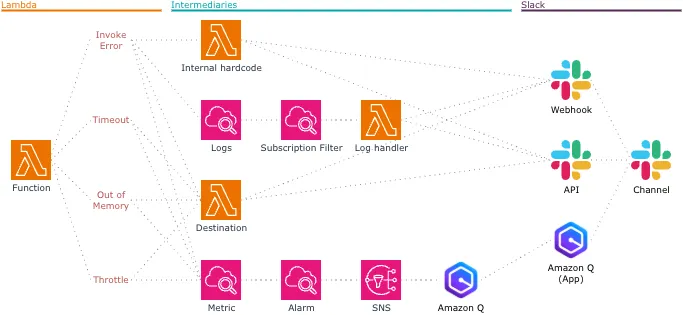
The figure above depicts four ways to send Lambda errors to a Slack channel.
- Internal Hardcode
- CloudWatch Logs Subscription Filter
- Lambda Destination
- CloudWatch Metric & Alarm + SNS + Amazon Q in chat application
Serverless applications become more common each year, and they are likely to rely on Lambda. Monitoring Lambda and being notified errors is crucial in cloud-native infrastructure.
There are lots of messaging platform in the world. Nevertheless, I predict that many teams use Slack as a messaging tool. Slack is the most likely channel that developers get notified.
There are four types of Lambda errors: (1) Invoke Error, (2) Timeout, (3) Out of Memory, (4) Throttle.
To send an error message to a Slack channel programmatically from AWS cloud, Slack has three endpoints: (1) Webhook, (2) API, (3) Amazon Q App.
This blog reviews the four methods how to deliver Lambda errors to a Slack channel.
Internal Hardcode
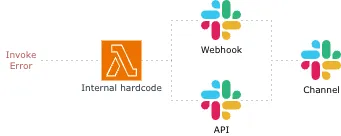
The JavaScript code below catches any thrown error that occurs in the try block, and it sends a error message to a Slack channel via Webhook.
const handler = async (event) => {
  try {
    // Logics
  } catch (error) {
    let text;

    if (error instanceof Error) { text = error.message; }
    else if (typeof error === 'string') { text = error; }
    else { text = 'Unknown error'; }

    await fetch(process.env.SLACK_WEBHOOK_URL, {
      method: 'POST',
      headers: { 'Content-type': 'application/json' },
      body: JSON.stringify({ text: error.message }),
    }).then((response) => {
      return response.text();
    }).then((data) => {
      console.log('data', data);
    });

    throw error;
  }
}
This solution is the most obvious. The logic of error reporting can be a module as Layer to be shared across number of Lambda functions.
This is a strong anti-pattern. It tightly couples business logic to a third-party api (Slack). If Slack is down, or the function times out, the error tracking fails entirely. Also, catch cannot catch other three types of errors. Handling an error withing the code fails to report all types of errors.
Do not handle an error withing the function.
CloudWatch Logs Subscription Filter
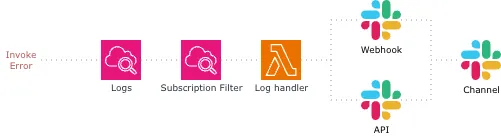
We can trigger a Lambda function when a certain pattern of string is streamed to the logs by CloudWatch Logs subscription filter. The filtering patterns are usually ERROR, Error, and error. We can subscribe warnings as well simply by adding an extra match patterns.
Log events are passed to the Lambda function in the following data structure:
{
  awslogs: {
    data: 'base64-encoded-and-compressed-string'
  }
}
The event data is Base64 encoded and compressed. In order to read raw log text, we must first uncompress and decode the data. After uncompressing and decoding, the log data has the following JSON structure:
{
  "logGroup": "/path/to/log/group",
  "logStream": "YYYY/MM/DD/[$LATEST]hash",
  "logEvents": [
    "Error Message"
  ]
}
Extracting the raw log, we can send the error message to Slack via either Webhook or api, with the similar code shown in the Internal Hardcode section.
Lambda subscription filter is the best approach when we want to send the exact log message (the actual stack trace) to Slack, because the subscription filter feeds the raw log chunk straight into an error handler.
Still, we cannot yet receive errors on Slack except the invoke error. We could subscribe keyword like timeout. But there is still a chance that the Lambda function might log “timeout” internally in the fallback code.
Lambda Destination
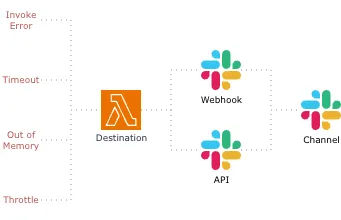
Lambda has two invocation types: synchronous and asynchronous. When a Lambda function is triggered asynchronously, we can set up Destinations. Destinations enables us to route asynchronous function results as an execution record to a destination resource without writing additional code.
On failure, Lambda can routes the record of failure to one of Lambda, SNS, SQS, EventBridge, and S3. Among them, Lambda is the most suitable to make Webhook or api requests.
Implementation to make http requests is no different from Internal Hardcode and CloudWatch Logs Subscription Filter.
The best benefit we can attain from Lambda Destination is that we can handle all types of Lambda errors with single function. A function appointed as Destination would receive the event like below:
{
  version: '1.0',
  timestamp: '2026-06-15T23:16:22.482Z',
  requestContext: {
    requestId: '30f163b6-99f6-40f6-8fde-7e9908b3764c',
    functionArn: 'arn:aws:lambda:us-east-1:123456789012:function:lambda-destination-error-handler:$LATEST',
    condition: 'RetriesExhausted',
    approximateInvokeCount: 1
  },
  requestPayload: { key1: 'value1', key2: 'value2', key3: 'value3' },
  responseContext: {
    statusCode: 200,
    executedVersion: '$LATEST',
    functionError: 'Unhandled'
  },
  responsePayload: {
    errorType: 'AccessDeniedException',
    errorMessage: 'User: arn:aws:sts::123456789012:assumed-role/lambda-destination-error-handler-role/lambda-destination-error-handler is not authorized to perform: ssm:GetParameter on resource: arn:aws:ssm:us-east-1:123456789012:parameter/path/to/parameter because no identity-based policy allows the ssm:GetParameter action',
    trace: [
      'AccessDeniedException: User: arn:aws:sts::123456789012:assumed-role/lambda-destination-error-handler-role/learning-send-errors-to-slack-channel is not authorized to perform: ssm:GetParameter on resource: arn:aws:ssm:us-east-1:123456789012:parameter/path/to/parameter because no identity-based policy allows the ssm:GetParameter action',
      '    at de_AccessDeniedExceptionRes (/var/runtime/node_modules/@aws-sdk/client-ssm/dist-cjs/index.js:7721:21)',
      // …
    ]
  }
}
We have all information necessary for debug.
Asynchronous invocation has build-in retries and dead-letter queue mechanisms. These features harness resilience beyond sending errors to the third party.
Drawback of Lambda Destination is that the function must be invoked asynchronously, and types of invocation can be determined by the AWS service triggering Lambda. The common AWS services that invoke Lambda functions asynchronously are:
- S3
- SNS
- EventBridge
- SES
- CloudWatch Logs
API Gateway is default to synchronous behavior but we can change the invocation type from synchronous to asynchronous by adding the http header X-Amz-Invocation-Type: Event in a non-proxy integration.
CloudWatch Metric & Alarm + SNS + Amazon Q
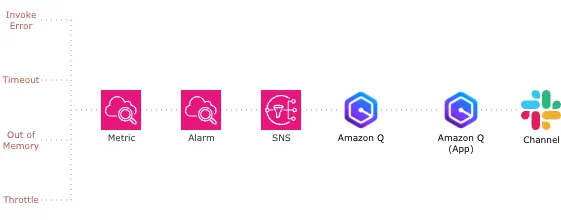
Instead of creating a custom Slack webhook or writing Lambda http request code, we can use Amazon Q Developer in chat application, previously called AWS Chatbot. Amazon Q Developer in chat application enables DevOps and software development teams to use messaging program chat channels to monitor and respond to operational events in their AWS Cloud.
Each Lambda function comes with a default metric Errors. Set up the CloudWatch Alarm on this metric. Let’s say sum of error counts is greater than zero during one minute and the alarm action is SNS topic.
In Amazon Q Developer in chat application, we create a Slack client and a channel that subscribes the same SNS topic that CloudWatch Alarm acts on.
Each time the alarm goes to the ALARM state, Amazon Q posts a formatted alarm message to Slack.
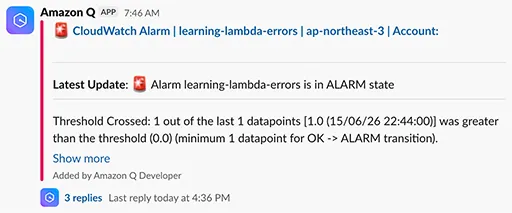
Drawback of this solution is that the detail of error cannot be known from the message. If the error is caused by the code, we have to begin by finding the error log first. Nevertheless, this no code solution still enables us to be notified whether any types of Lambda error happened or not.
Conclusion
The best practice how to report Lambda errors to a Slack channel depends on the type of Lambda invocation.
Asynchronous Invocation
Use Lambda Destination.
Event data in Lambda Destination function includes all information what type of error happened and why the error happened. Event data can be easily transferred to Slack via webhook or api in the form of json string.
Synchronous Invocation
Use CloudWatch Metric & Alarm + SNS + Amazon Q, conjunction with CloudWatch Logs Lambda subscription filter.
With the former we will be able to receive all types of Lambda errors. The latter compensates for CloudWatch Alarm that detects just whether an error occurred or not.
Resources
- How Lambda handles errors and retries with asynchronous invocation
- Implementing AWS Lambda error handling patterns
- Mastering Error Handling in AWS Lambda: A Comprehensive Guide
- Let’s dive deep into AWS Lambda error handling
- Implementing error handling for AWS Lambda asynchronous invocations
- Handle Lambda errors in API Gateway
- Tutorial: Using Amazon Q Developer in chat applications to run an AWS Lambda function remotely